Product improvement
Make the friction specific.
Identify the situation, failure and consequence before choosing between a seal, easier cleaning or better instructions.
 NUCLEAR POWER CREATIVE
Understand the customer. Choose your next move.
VOC looks beyond counting brand mentions to understand what customers need, what gets in their way and why they choose. Follow an example, copy the setup prompt, prepare social sign-in, then use three prompts for collection, analysis and an interactive HTML report.
Visibility and customer needs answer different questions
Find customer words with useful context
Move from original words to labels and insights
Use filters, matrices and original feedback
VOC stands for Voice of Customer. Reviews, forum questions, interviews and support conversations reveal tasks, experiences, choices and concerns. Brand mentions and VOC complement each other, but they answer different questions.
| Question | Brand mentions | VOC insights |
|---|---|---|
| What it examines | How often a brand or product is mentioned, where it appears and how that changes. | What customers are trying to do, the friction they encounter and why they choose or reject an option. |
| A simple example | “I keep seeing this blender brand everywhere.” | “It leaks in my bag during my commute, and I still have to wash it at the office.” |
| What it helps decide | Where the conversation is happening and how brand visibility is changing. | Which product problems to fix, which benefits to communicate and whom to serve. |
| Must the brand be named? | Brand mentions are usually identified through brand names, product names or related terms. | No. Questions, workarounds and unmet needs can be useful without naming a brand. |
Identify the situation, failure and consequence before choosing between a seal, easier cleaning or better instructions.
Turn motivations, barriers and real expressions into messages, demonstrations and useful purchase answers.
Study workarounds, alternatives and compromises to choose the next product idea to test.
These fictional comments are written for teaching. Follow the path from the customer’s words to an interpretation and a possible action, then use your own collected material for real research.
“I put fruit and milk in it before taking the train and blend at the office. But it leaks in my bag, and the area under the blade is hard to clean.”
The task is a commuting breakfast. The desired outcome is carrying ingredients and blending later. Leakage and blade cleaning are two separate problems.
In this commuting situation, portability is more than a small size: it means safe transport, use on arrival and an easy clean-up.
Product: test the seal and cleaning design. Marketing: demonstrate the full trip from bag to office to clean-up. Research: compare more commuting and non-commuting feedback.
Ask who is trying to achieve what, in which situation, and what prevents it. Translate that into a product change, a useful demonstration or the next research question.
Open the teaching HTML reportUse an Agent that can read local files, load Skills and run programs on your computer. An ordinary web chat may not have those capabilities. Ask our team for setup help if local execution is unavailable.
The Agent checks the existing environment, selects the appropriate application from the official Task Master GitHub release, and installs the Task Master instructions and specialist Skills. A working installation is reused. You handle system approvals, sign-in and verification yourself.
Copy one setup instruction. Let the Agent find the packages.
Set up a VOC workflow on this computer. First read https://github.com/npcworkspace-cmyk/eric-task-master/blob/main/skills/eric-task-master/SKILL.md and check the existing Task Master installation and stable Chrome. Reuse a working installation; do not stop a shared Manager or recreate profiles. Only after confirming absence, select the official application and matching Skill for this OS and CPU from https://github.com/npcworkspace-cmyk/eric-task-master/releases/latest, verify SHA256SUMS and install. Use the official portable package in a permanent directory if the installer is unsuitable. I will handle system approvals. Install https://www.npctech.site/downloads/voc-workflow.zip and https://www.npctech.site/downloads/voc-collection-skills.zip and read each SKILL.md. Keep newer Task Master instructions from the official release if a specialist bundle contains an older copy. Check the local capabilities needed for HTML reports. Finally, only open the dashboard and guide my manual sign-in preparation. Do not create a collection task or ask for passwords, cookies or verification codes.
The application comes from the public Task Master GitHub release. Specialist packages are public website downloads. You still handle system and Agent permission prompts.
This command opens the dashboard without creating a collection task. Use the address returned by your own installation rather than someone else’s loopback URL.
Open the dashboard
Open the existing Task Master dashboard on my computer and give me its local link. Do not create a collection or email task or change the default profile.
A Profile is a persistent, separate Chrome environment. Give work accounts clear names and reuse the same profile instead of creating a fresh environment for every task. Chinese button names below match the current dashboard.
Select Profiles / 浏览器 Profiles in the Task Master dashboard, then 新建 Profile. Reuse an appropriate existing environment when one is already available.
Use a purpose-based name such as VOC-Reddit, VOC-Facebook or Outreach-Gmail. To rename an existing environment, choose 改名 on its card.
This opens your computer’s stable Chrome. Sign in in this window, not a separate everyday browser window or an incognito session.
For VOC, prepare Reddit or Facebook. For creator discovery, prepare the platforms in your brief. For email, prepare your own Gmail account. Complete passwords, two-factor authentication and verification yourself.
On a computer you control, you may accept Chrome’s password-saving prompt or use a trusted password manager. Select a platform’s stay-signed-in option when available. Never paste passwords, codes, cookies or recovery codes into the Agent.
Close all Chrome windows for the profile, reopen it from the dashboard and confirm the website is still signed in. Close it again before automation. Do not sign out or clear the site cookies.
Use 设为默认 for a frequently used profile. With several work accounts, tell the Agent to use VOC-Reddit or Outreach-Gmail. Give each profile to only one active task at a time.
Persistent state does not mean a permanent login. Websites can request verification again; password changes, device changes or cleared cookies can end a session. Reopen the original profile and sign in manually when needed.
Buying an account is not a setup requirement. Prefer a dedicated account you created or are authorised to manage and can recover. Cheap third-party accounts can be reclaimed, shared or restricted. Check transfer rules, provenance and full recovery control; never use stolen accounts, shared cookies or account rotation to bypass restrictions.
Open Settings → System → Notifications. Enable notifications and banners for the actual sending application, and check Do Not Disturb / Focus settings. The displayed application name depends on the installation.
In System Settings → Notifications, allow notifications for the application that sends the reminder and check Focus settings. Delivery depends on local permissions and system settings.
When a task detects verification, it waits and notifies you. Open its retained browser window, complete the check yourself, then use the dashboard’s available resume action or tell your Agent to continue the original task. A single click is not guaranteed to pass verification. Do not switch accounts to bypass it.
The task may pause after its waiting limit. Preserve the original task and outputs and resume from the dashboard. If its process has ended, inspect saved results before planning a new attempt. Do not blindly repeat an email send.
A notification asks for your attention; it does not solve a CAPTCHA. Check the dashboard’s waiting state if a notification does not appear. You do not need every social website’s marketing notifications.
Windows notification settingsReplace the bracketed inputs and give the prompts to the same Agent in order. Already have reviews, interviews or support files? Start with prompt 2. Keep the material and research state in the project so you can continue later.
Start with one source. The Reddit Skill collects comments from known discussion URLs; the Agent first discovers real links when needed. The Facebook Skill collects accessible group posts, not complete comment threads.
Reddit research template
Use Task Master and the Reddit comments Skill with profile [name] to research [business question] about [product/category] in [market/language]. Discover real discussion URLs from [keywords/reference discussions], then collect their comments; start directly from supplied post URLs when available. Period: [dates]. Target: [count] comments. Include positive, negative and pre-purchase concerns. Keep full text, comment IDs, post and parent relationships, source links, dates and evaluated objects. Report raw records, unique comments and actual gaps separately and export the original files. Give me the dashboard link first. Wait for my manual sign-in or verification when required; do not bypass, publish or interact.
Facebook group post template
Use Task Master and the Facebook group posts Skill with profile [name] to collect accessible group posts from [authorised group URL] during [dates], targeting [count] posts for [product/business question]. Keep full text, post IDs, links, dates, available interaction fields and group source. Export original data and state actual coverage and gaps. This package collects group posts, not a complete comment thread; do not describe post counts as comment counts or enter unauthorised material. Wait for my manual verification when needed.
Tell the Agent which business decision the research should inform. The Skill guides intake, viewpoint decomposition, labels and insights, then assembles the report. You do not need to rewrite a complex spreadsheet template first.
VOC analysis and report template
Use VOC Workflow to analyse the files just collected or uploaded. Object: [product/service]. Decision: [product improvement/message/new opportunity]. Preserve text and sources and merge only copies of the same content, never distinct comments sharing a post URL. Separate pre-purchase questions, experienced use and seller claims. Build situation, audience, feature-experience and concern labels from the material and preserve local positive and negative views. Complete cleaning, labels, insights and the HTML report; ask only about missing context that would change the business question. Use the Skill’s V28 template with all 11 tabs, filters, matrices and original feedback. Explain support, counterexamples, scope and next actions without inventing sales, identities or market share.
Ask for actions first, then return each judgement to its feedback, counterexamples and conditions. Revise labels or add a competitor within the same project without repeating completed collection.
Report interpretation template
Walk me through this VOC HTML report. Start with the three most useful product or marketing actions, then show supporting feedback, counterexamples and situations for each. Explain mentions, valid denominators and the positive-expression rate. Do not treat sample mentions as worldwide brand visibility or co-occurrence as causation. Finish with what to collect next, what to test first and which conclusions should not yet become public claims.
Open the teaching report and follow the screenshots. Start with opportunities, inspect situations, features and matrices, then read the original feedback. A feature’s mention count here refers to this research sample, not worldwide brand visibility.
Check records, label mentions and valid denominators. One record can discuss several aspects, so label counts are not automatically a count of people.
Read the evaluated object, conditions, support and counterexamples. Matrix co-occurrence is a lead, not automatic proof of causation.
Consider consequences, workarounds and practical actions. Frequent issues are not always the most important; a rare consequential failure may deserve an early test.
Read the situation distribution and try the source or label filters. Compare the feedback behind commuting, fitness and other contexts.
Open the report and try it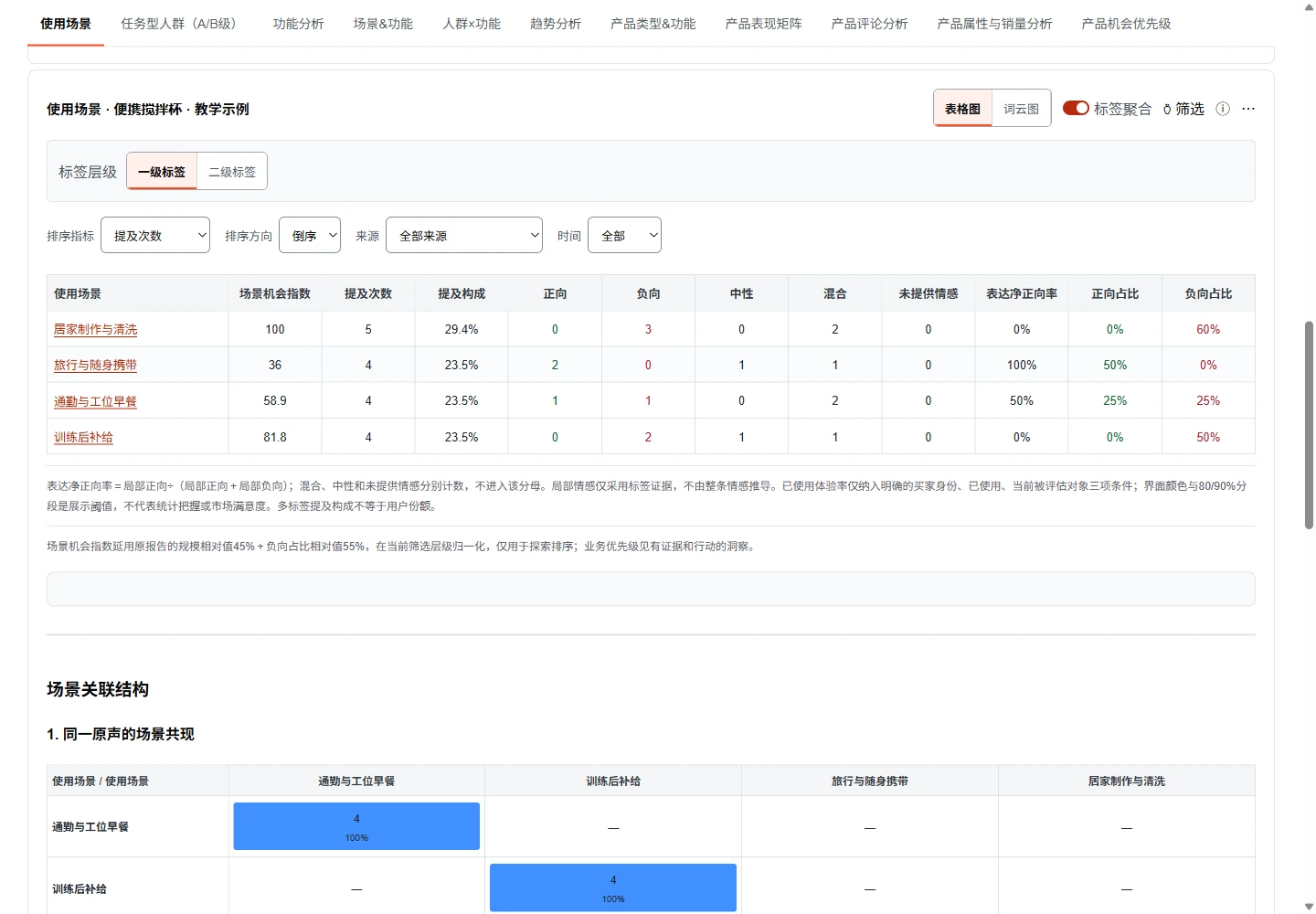 View full-size screenshot
 The horizontal axis shows mentions of an experience within the sample. The vertical axis shows positive expressions among positive and negative ones. Return to the feedback to understand why.
Open the report and try it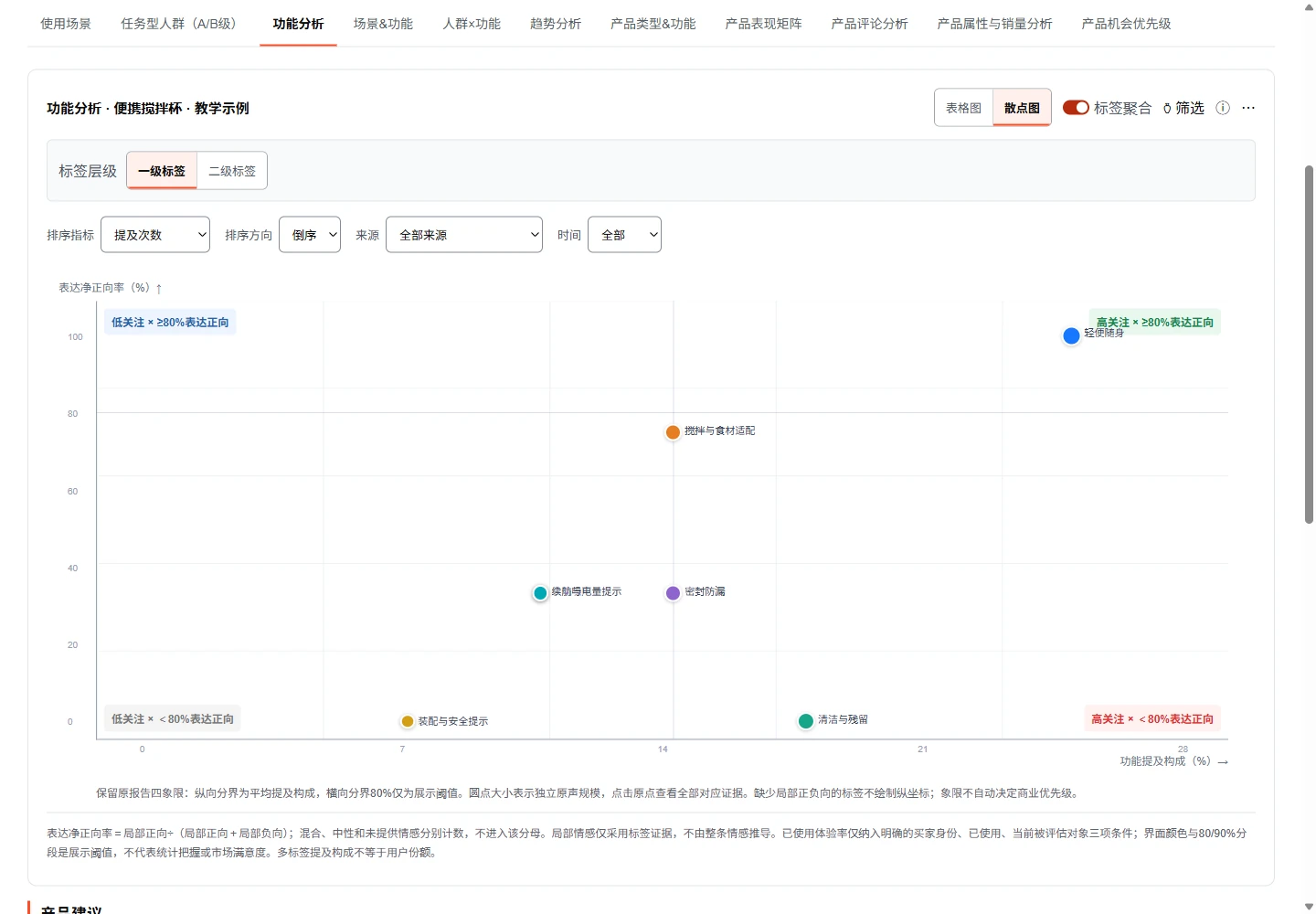 View full-size screenshot
 In the situation-by-feature matrix, select travel and carrying × leak-proof sealing. Compare the same feature across situations to see when the problem happens.
Open the report and try it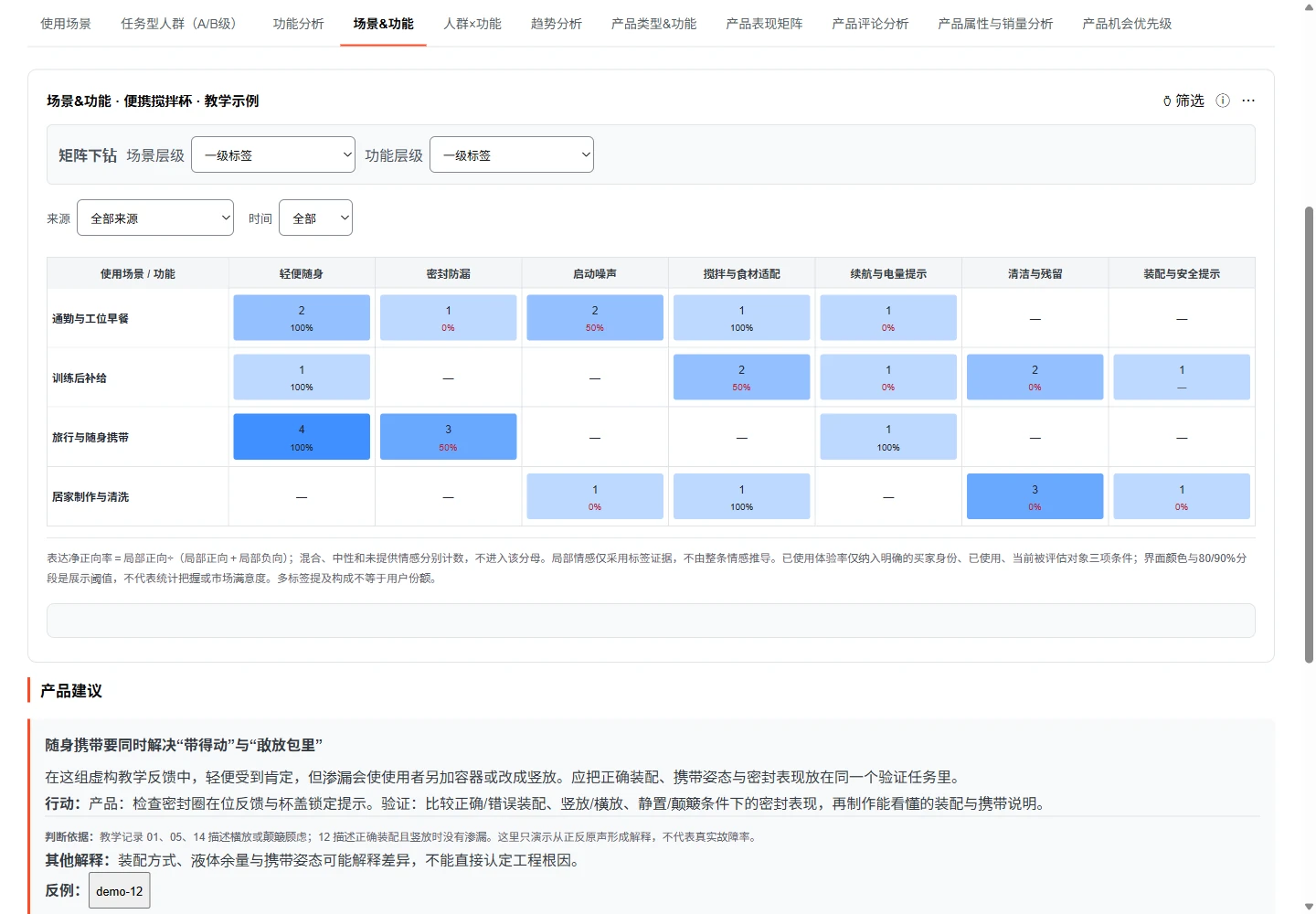 View full-size screenshot
 This cell contains three fictional teaching records: one positive, one negative and one neutral. Switch sentiment filters and read the context. The 50% rate counts positive expressions among positive and negative ones, excluding neutral feedback.
Open the report and try it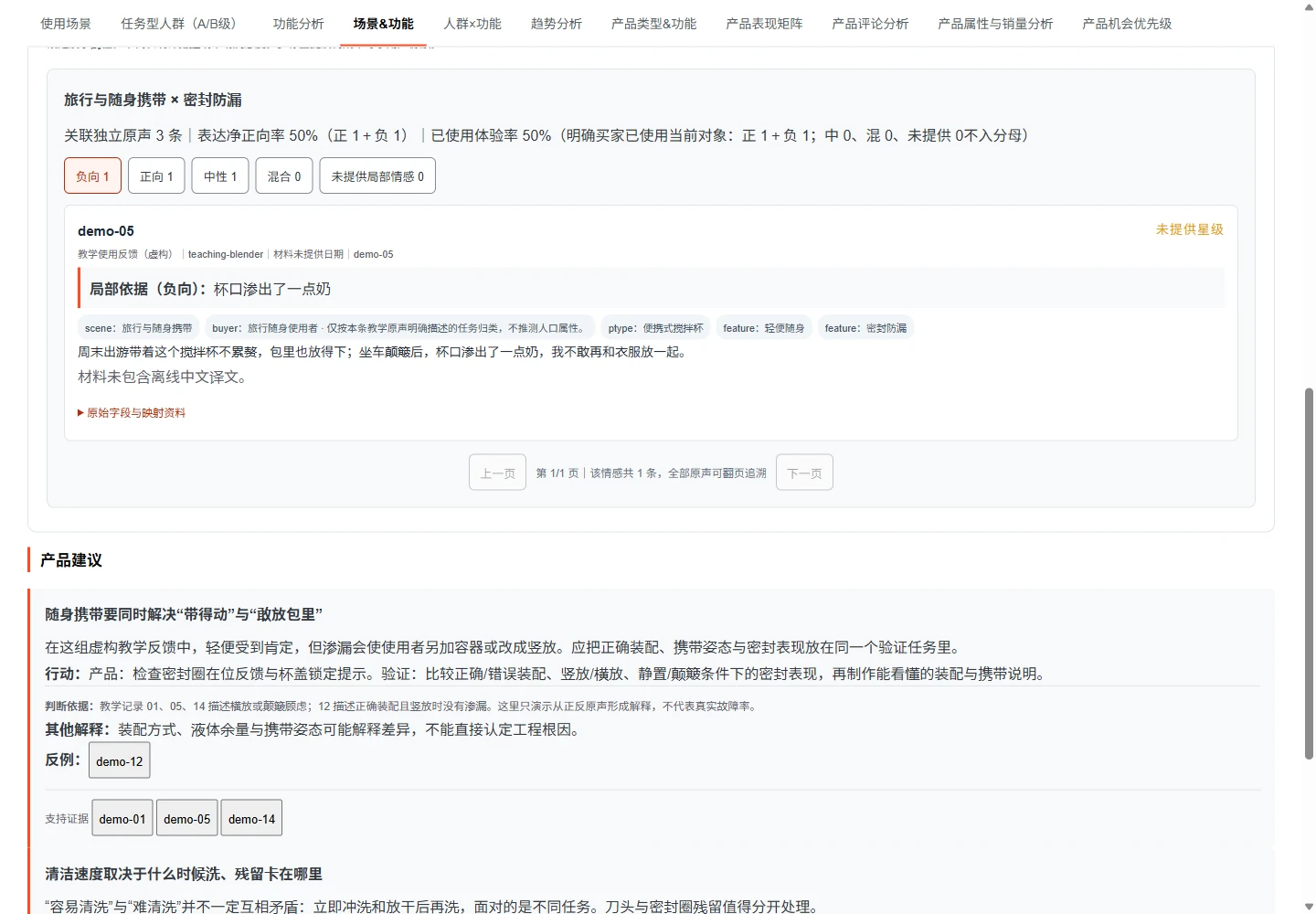 View full-size screenshot
 | Using the 11 tabs | What to look for |
|---|---|
| Situations / Audiences | Start with tasks and use conditions, then examine roles and audience groups supported by the feedback. |
| Feature experience | Read mentions, local positive and negative expressions, and original feedback together. |
| Situation × feature / Audience × feature | Compare experience across contexts and groups, then click a cell to see the feedback. |
| Trends / Product types | Use dated records to understand changes and compare different types of solution. |
| Product comparison / Product reviews | Compare the same experience across specific products and read their original reviews. |
| Attributes and sales | Explore relationships when actual product attributes, prices and sales data are available. |
| Opportunities | Review the problem, supporting feedback, alternative explanations and proposed next action. |
After setup and manual sign-in, the collection, analysis/report and interpretation prompts can start the complete workflow. The Agent follows the necessary Skill steps. You still provide a real brief and handle verification, missing decision context or system approvals. This is not a promise of an unattended one-click platform.
No. Give the Agent your CSV, XLSX, JSON, JSONL, interview or support files and start with analysis. Preserve original words, source or file locations, dates and evaluated objects rather than replacing feedback with summaries.
No. They count expressions about a label or experience within this material. Sources, queries, dates and deduplication shape the sample. A positive-expression rate is not market satisfaction. Read valid denominators, sources, original feedback and counterexamples together.
Ask the original Agent to preserve source material and manual revisions, review and recalculate only affected parts, then generate a new HTML report. The report is for reading and filtering; label changes happen in the research workflow, not directly in the report page.
Guide and capability boundaries reviewed:
Contact our team for free help setting up Task Master and specialist Skills, including KOC lead and VOC collection configurations.
Get free setup helpIf you want to connect the report with positioning, product definition or new product opportunities, an expert can work through the priorities and choices with your team.
Move from a one-off study to ongoing listening and appropriate community responses.
Answer real buying questions with product facts you can support.
Turn situations and concerns into content-fit criteria and outreach angles.